Erika: tebe tak rada vidim ????
Erika: A taky zdravim Ivet, jestli je to TA Ivet
Rachel: Ahoj, taky žiju ,Nakoukla jsem, protože kámoš potřebuje pomoc, tak jsem si řikala, jestli se to tu náhodou nezlepšilo....
Rachel: Veselý vánoce všem!
Chuchto: Od Nového roku o slepičí krok a na hromnice o hodinu více.
Chuchto: Kolik lidí se ti vlastně potkalo a nezná z léčebny? Jen já, ale ok, asi posloužilo toto forum, pro lidi z podobných skupin různých leceben. Ono se to "rady a porady" asi vyléčit nedá, to by zaislosti nebyla MKN klasifikovana nemoc a nebylo by třeba personálu a leceben. Zdarec jak svina a PF 20026!
Chuchto: Vypadá to tu, že se to otočilo na podporu závislostí. Někdo nebo něco tu automaticky přeposílá asi AI reklamu na kasína, chybí Captcha ověřování, že přispěvatel není automat, ale člověk. No nic
Chuchto: Se mi zo tady líbilo a bylo to tu dobrý. Generace formující se tu vyskytovala, já jsem spíš generace napodobující a mezistupňová přechodu mezi těmi co vyrostli ještě v účtě k pravidlům co se dodržovali a způsoby neměli nijaké, že až budou potřeba, tak se napodobí. Dnešní mladí asi odvykají jinak, nevím. Jinak bylo to tu fajn. Renesanční nápad tohle udělat. Volné, není to jen přemoderovaný video blog jako abstinenti Liberec třeba. Zdar:)
Chuchto:
Je to jak v tom vtipu. Roubíček vidí Kohna v smutečním průvodu. "Kohn kdo vám zemřel, manželka?!" Kohn odpoví:"tchyně." "Taky dobrý," podotkne Roubíček. "A neměl byste dvoustovku?!"Ne, neměl." A doma!?" Doma dobrý, děkuji." odpoví Kohn. A z žen jsou časem tchyně, pokud jsou sexy a i děti se maj k světu. 
Richard: Zdar.
Richard: Tak mám za sebou 16 let.
Richard: Paráda
Richard: Akorát mi přijde, že to tady nějak nefunguje..... Jsou tu podivné nové místnosti plné kravín
Rachel: ano nefunguje, majitele to tu nezajímá. 16 let to je teda mazec
Rachel: já jsem překročila 3,5 roku
Jindřich:

Chuchto:
Chucht! Taky tu vidím, že vyschlá suchá loz bez kvítí bez vody a já vidím ty Sakury v květu, asi se na to tady sorry jako.. Čus, držte se! Chuchto: Rady jsem zjistil nemohu dávat ani po 3 letech jak tu psal Richard nebo kdo, že si mám počkat a pak teprv radit. Tato diskuse tedy krom toho, že nefunguje, tak mnou o nic nepřichází, rady jsem zjistil nemohu vůbec dávat...to nebudu ani vysvětlovat, byla by to rada... Ty nemysli a dělej, řekli mi... pro ilustraci.. Good luck!
Chuchto: Nemáte taky slinu? Písek ze Sahary a Tropické teploty v Praze. A to je teprve 24.5.! Zdarec jak sviňa! Jen to neprekoučovat a nepřešpekulovat. A kdo to podcenil tak se držte a nasaďte zas hned zítra abstinenci. Ahoj
frank: Bonuses significantly enhance the user experience by providing additional value and increasing engagement. They can come in different forms such as welcome rewards, promotions, or special offers. These incentives allow users to explore platform features more freely and extend their interaction with the service. Bonuses also create a more motivating and enjoyable environment for users. Many platforms use them as part of their engagement strategy. bizbet is often cited as an example of a platform that uses bonus systems to attract and retain users, helping them explore features and enjoy a more dynamic entertainment experience:
Chuchto: Zmastit se je tak snadné, prej zkušení alkoholici tvrdí, že záleží na charakteru, kolik vodky mohou vypít.. Kotel pak dopadne jak sklad hnojiv ala Bejrůt. Pěkný víkend.
Chuchto:
Blb vlk pln žbrnd zdrhl hrd z mlh Brd skrz vrch Smrk v čtvrť srn Krč. ladis: Ahoj
Richard: Zdarec....jak se tu máte?
Richard: Dneska mám 5 981 den totální abstinence..
Richard: Zdary! Tak dnes slavím 6000 dnů abstinence!!!! Paráda!!!
Richard: Každopádně koukám, že je to tu úplně mrtvé...
Rachel: Richarde to je hustý, gratujulu!
VasyaBeast:

VasyaBeast: nigga
Richard: Tedy tady to fakt totálně upadlo....
Richard: Rachel - díky....
Richard: Dnes tedy 6081 dnů...
Richard: Jako nevycházím z údivu, jak tento web upadl do zapomnění....
Richard:


 Fórum
Fórum














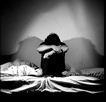 Alkohol je dobrý tehdy, když potřebujeme něco zapít - ať už je to něco příjemné nebo zlé. Když to zapíjíme moc dlouho, tak se ale utopíme.